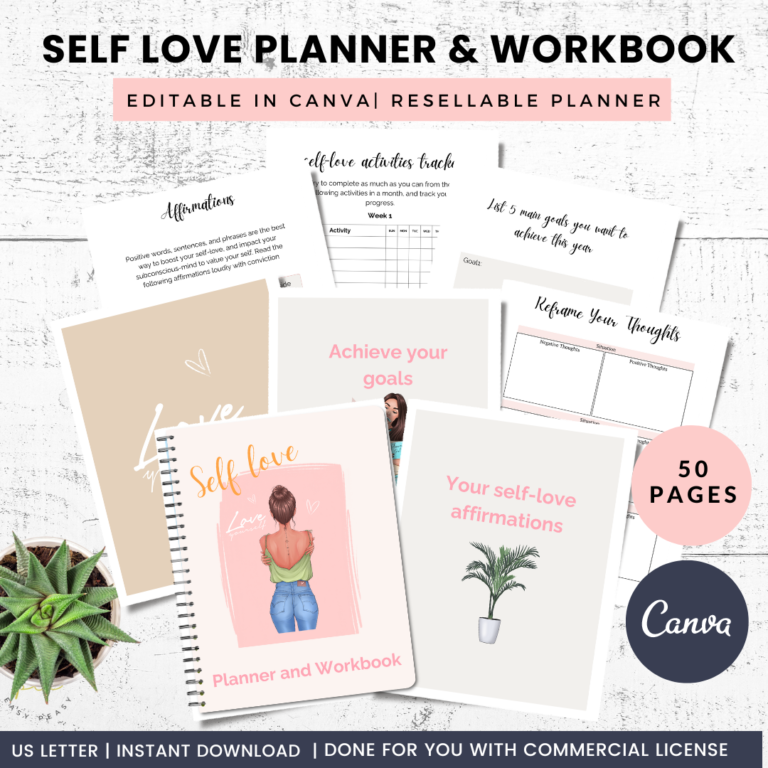
Have you ever wondered how thousands of self-publishers are earning passive income by selling simple journals on Amazon KDP?
The good news is that you don’t need to be an author, graphic designer, or publishing expert to create a journal that customers will love. In fact, to create a journal is one of the easiest low content books to publish because they require minimal written content while offering real value to buyers looking to organize their thoughts, track habits, or record important memories.
Whether you’re hoping to create your first passive income stream or expand your existing publishing business, learning how to create a journal for KDP is an excellent place to start. With the right niche, thoughtful interior design, and an attractive cover, your journal can continue generating sales long after you’ve published it.
This step-by-step guide walks you through the entire process—from choosing a profitable niche to designing your interior, creating a professional cover, and preparing your journal for publication on Amazon KDP.
Disclosure: This post contains affiliate links, which means I may earn a small commission if you make a purchase through them—at no extra cost to you. I only recommend products I truly believe in and think could support your well-being. Thanks for supporting the blog! My disclosure policy can be found here.
What Is a KDP Journal?
A KDP journal is a low content book published through Amazon Kindle Direct Publishing (KDP). Unlike traditional books, journals contain little or no written content and instead provide structured pages for customers to write, plan, reflect, or organize information.
Popular journal types include:
- Gratitude journals
- Daily journals
- Dream journals
- Prayer journals
- Pregnancy journals
- Fitness journals
- Reading journals
- Recipe journals
- Gardening journals
- Self-care journals
- Travel journals
- Manifestation journals
- Anxiety journals
- Pet journals
- Business journals
Because journals appeal to so many audiences, there are endless opportunities to create products for different niches.
Step 1: Choose a Profitable Journal Niche
Before designing anything, decide exactly who your journal is for.
Trying to appeal to everyone often leads to poor sales.
Instead, focus on solving one specific need.
Ask yourself:
- Who will use this journal?
- What problem does it solve?
- What goal does it help the user achieve?
- Is there demand for this type of journal?
Some profitable niches include:
Wellness
Examples:
- Mood Tracker
- Self-Care Journal
- Gratitude Journal
- Mental Health Journal
- Anxiety Workbook
Productivity
Examples:
- Goal Planner
- Daily Success Journal
- Time Management Journal
- Business Planner
- Content Planning Journal
Hobbies
Examples:
- Reading Log
- Tea Tasting Journal
- Bird Watching Journal
- Gardening Journal
- Photography Journal
- Knitting Project Journal
Lifestyle
Examples:
- Wedding Planner
- Pregnancy Journal
- Baby Memory Book
- Budget Journal
- Meal Planning Journal
The more specific your niche, the easier it becomes to market your journal to the right audience.
Step 2: Research the Competition
Before creating your journal, spend some time browsing Amazon.
Look at bestselling journals in your chosen niche and pay attention to:
- Cover styles
- Interior layouts
- Customer reviews
- Common complaints
- Features buyers appreciate
- Journal sizes
- Number of pages
- Keywords used in titles
Don’t copy existing products. Instead, identify ways to make your journal more useful, attractive, or unique.
For example, if customers repeatedly mention they wish there were more writing space or additional tracker pages, you can incorporate those improvements into your own design.
Step 3: Decide on Your Journal Size
Amazon KDP offers several trim sizes, but a few are especially popular for journals.
Common choices include:
6″ x 9″
Perfect for:
- Daily journals
- Gratitude journals
- Dream journals
- Pocket notebooks
8.5″ x 11″
Ideal for:
- Workbooks
- Planners
- Budget journals
- Activity books
- Educational journals
7″ x 10″
Great for:
- Wellness journals
- Self-care planners
- Guided journals
- Goal journals
Think about how your customer will use the journal before choosing the size.
Someone carrying a journal in a handbag may prefer a compact format, while a planner designed for home use often benefits from larger pages.
Step 4: Plan Your Interior
The interior is where your journal provides value.
Start by deciding what pages you’ll include.
A simple gratitude journal might contain:
- Daily gratitude prompts
- Today’s affirmation
- Goals for today
- Positive reflection
- Notes section
A reading journal may include:
- Book title
- Author
- Rating
- Favorite quotes
- Characters
- Lessons learned
- Reading dates
A business journal could include:
- Daily priorities
- Meeting notes
- Project tracker
- Brainstorming pages
- Weekly review
- Goal setting
Sketch your page order before opening your design software.
Planning first saves time later.
Step 5: Design Your Interior Pages
Now it’s time to create your pages.
Keep your design clean, simple, and easy to use.
Focus on:
- Readable fonts
- Consistent spacing
- Wide writing lines
- Clear headings
- Logical page flow
- Plenty of white space
Avoid overcrowding each page with decorative elements.
Remember, customers purchase journals to write in—not to admire complicated graphics.
Simple layouts often outperform busy designs.
Step 6: Add Helpful Prompts
Blank pages work well for notebooks, but journals often become much more valuable when they include prompts.
Examples include:
Gratitude Journal
- What made you smile today?
- What are you thankful for?
- Who inspired you today?
Goal Journal
- What’s your biggest priority?
- What obstacle can you overcome?
- What’s one action you can take today?
Self-Care Journal
- How do you feel today?
- What can you do for yourself?
- What’s one positive thing about today?
Guided prompts help users stay engaged and encourage them to return to your journal every day.
Step 7: Choose Professional Fonts
Typography plays a major role in readability.
Stick with fonts that are clean and easy to read.
Excellent font pairings include:
- Playfair Display + Poppins
- Libre Baskerville + Lato
- Cormorant Garamond + Montserrat
- DM Serif Display + Open Sans
Limit yourself to two or three fonts throughout the journal.
Using too many font styles creates an inconsistent and unprofessional appearance.
Step 8: Create an Attractive Cover
Your cover is your most important marketing tool.
Even the best journal won’t sell if buyers don’t click on it.
Your cover should:
- Clearly communicate the journal’s purpose
- Match your target audience
- Be readable as a small thumbnail
- Use attractive typography
- Include high-quality graphics
- Feel professional and polished
For example:
A gratitude journal might use calming botanical illustrations and soft neutral colors.
A business planner could feature modern typography and minimalist geometric designs.
A travel journal might incorporate maps, mountains, or passport-inspired graphics.
Your cover should instantly tell buyers who the journal is for and what they can expect inside.
Step 9: Write a Keyword-Rich Title and Subtitle
Amazon uses your title to help shoppers discover your journal.
Rather than simply calling your book “Journal,” include keywords your audience is already searching for.
For example:
Gratitude Journal: A Daily Guided Journal for Positivity, Mindfulness, Reflection and Personal Growth
Or:
Reading Journal: Book Review Log, Reading Tracker and Favorite Quotes Notebook
Natural keyword placement improves discoverability while keeping your title appealing to potential buyers.
Step 10: Prepare Your Files for Amazon KDP
Before uploading your journal, take the time to check that all of your files meet Amazon KDP’s specifications. A professional upload process reduces the chance of printing issues and helps ensure your book looks polished when it reaches customers.
Review the following before publishing:
- Correct trim size
- Proper bleed or no-bleed settings
- Consistent margins
- High-resolution PDF interior
- Print-ready cover file
- Correct page count
- Fonts embedded in the PDF
- No blank pages unless intentionally included
Printing a proof copy before making your book live is one of the best investments you can make. Seeing your journal in your hands allows you to catch issues that aren’t obvious on a computer screen.
Step 11: Upload Your Journal to Amazon KDP
Once your files are ready, log in to your Amazon KDP account and begin creating your paperback.
You’ll be asked to enter information such as:
- Book title
- Subtitle
- Author or publishing name
- Book description
- Keywords
- Categories
- Print options
- Pricing
- Territories
Take your time with this step. Well-written metadata helps Amazon understand your book and improves the chances of it appearing in relevant search results.
Step 12: Write an Engaging Book Description
Your description should explain exactly who the journal is for and why someone should buy it.
Rather than simply listing features, focus on the benefits.
For example, instead of writing:
“This journal contains 120 lined pages.”
Try:
“Create a daily habit of gratitude with thoughtfully designed pages that help you reflect, stay positive, and appreciate life’s little moments.”
Consider including:
- Who the journal is designed for
- The main benefits
- Interior features
- Page count
- Trim size
- Gift occasions
- Reasons it stands out from similar journals
An engaging description can increase conversions by helping shoppers imagine themselves using the journal.
Step 13: Price Your Journal Competitively
Pricing is an important part of your publishing strategy.
If your journal is priced too high, shoppers may choose a competitor. If it’s priced too low, buyers may perceive it as lower quality and your royalty will be reduced.
Research similar journals in your niche and consider factors such as:
- Page count
- Interior quality
- Cover design
- Brand reputation
- Bonus content
Remember that pricing isn’t permanent. As your journal gains reviews and sales, you can experiment with different price points to maximize profits.
Step 14: Publish and Promote
Publishing your journal is only the beginning.
To generate consistent sales, you’ll need a marketing strategy that brings visitors to your product.
Popular promotion methods include:
- Pinterest marketing
- Blogging
- Email newsletters
- Etsy (for printable versions)
- Social media
- YouTube tutorials
- Facebook groups
- Instagram Reels
- Short-form videos
Pinterest is especially effective for journals because users actively search for organization, planning, wellness, and productivity ideas.
If you already have a blog, create helpful articles related to your journal niche and naturally recommend your product within the content.
Common Mistakes to Avoid
Many first-time publishers make the same avoidable mistakes.
Watch out for these common pitfalls:
Choosing a Niche That’s Too Broad
Generic notebooks face enormous competition.
Instead of creating a simple lined journal, consider a more targeted product like a “Gardening Journal for Beginners” or a “Wedding Planning Journal.”
Overcomplicating the Interior
Simple, functional layouts are often more enjoyable to use than pages filled with decorative elements.
Prioritize usability over excessive design.
Ignoring Customer Reviews
Reviews are one of the best sources of product ideas.
Read competitor reviews to discover what customers love—and what they wish was different.
Publishing Without Proofreading
Even journals require careful review.
Double-check:
- Page numbers
- Spelling
- Margins
- Alignment
- Prompt consistency
- Font sizes
- Copyright page
A few extra minutes of proofreading can save you from poor reviews later.
Rushing the Cover Design
Your cover is often the deciding factor in whether someone clicks on your journal.
Invest time in creating a cover that feels professional, modern, and relevant to your audience.
Amazon Products That Support Pinterest Creators
- Content planning desk planner
- Productivity planners
- Blue light blocking glasses
- Ergonomic office chair
- Ring light for content creation
These products naturally align with content creators, bloggers, Etsy sellers, and online entrepreneur
Tips for Building a Successful Journal Business
Rather than publishing one journal and hoping for success, think long-term.
Successful self-publishers often build collections of related products.
For example, if your first journal is a Gratitude Journal, you could expand into:
- Gratitude Journal for Teens
- Gratitude Journal for Moms
- Gratitude Journal for Kids
- Guided Gratitude Journal
- Daily Reflection Journal
- Mindfulness Journal
- Self-Care Planner
- Positive Affirmation Journal
Creating complementary products strengthens your brand and encourages repeat purchases.
Another smart strategy is to develop reusable templates. Instead of designing every journal from scratch, create flexible layouts that can be adapted for different niches. This saves time while maintaining a consistent look across your publishing business.
Final Thoughts
Creating a journal for Amazon KDP is one of the most accessible ways to start a self-publishing business. With thoughtful niche research, a user-friendly interior, and a professionally designed cover, you can create products that customers enjoy using while building a valuable source of passive income.
Remember that success rarely comes from publishing a single journal. It comes from consistently creating high-quality products, learning from customer feedback, and expanding your catalog over time.
Every journal you publish teaches you something new, improves your design skills, and increases your chances of reaching more customers. The more intentional you are with your layouts, branding, and niche selection, the stronger your publishing business will become.
Ready to Publish Your First KDP Journal?
You don’t have to start from scratch. Creating journals becomes much easier when you have professionally designed templates, layouts, and resources ready to customize for your niche.
At ProfitablePrintables.com, you’ll find done-for-you journal templates, planners, workbooks, trackers, and low content book interiors that help you create beautiful products faster. Whether you’re launching your first KDP journal or expanding an established publishing business, quality templates allow you to spend less time designing and more time growing your passive income.
Choose a niche, customize your templates, publish consistently, and remember—every successful self-publisher started with a single book.
Frequently Asked Questions
Can beginners create journals for Amazon KDP?
Yes. Journals are one of the easiest low content books for beginners because they require minimal written content and can be created using design tools like Canva or Adobe InDesign.
Do I need graphic design experience?
No. While basic design skills are helpful, many successful publishers use templates to create professional-looking journals without advanced graphic design knowledge.
What size journal sells best on KDP?
Popular trim sizes include 6″ x 9″ for journals and notebooks, 7″ x 10″ for guided journals, and 8.5″ x 11″ for planners and workbooks. The best size depends on how your customers will use the journal.
How many pages should a journal have?
Many journals contain between 100 and 150 pages, but the ideal page count depends on your niche, content, and intended use.
Can I create journals in Canva?
Yes. Canva is a popular choice for designing both journal interiors and covers. Many creators also use Adobe InDesign, Affinity Publisher, or PowerPoint.
How do I make my journal stand out?
Focus on serving a specific audience, create a clean and functional interior, design a professional cover, include helpful prompts or bonus pages, and build a recognizable publishing brand.
Click To Find out more….